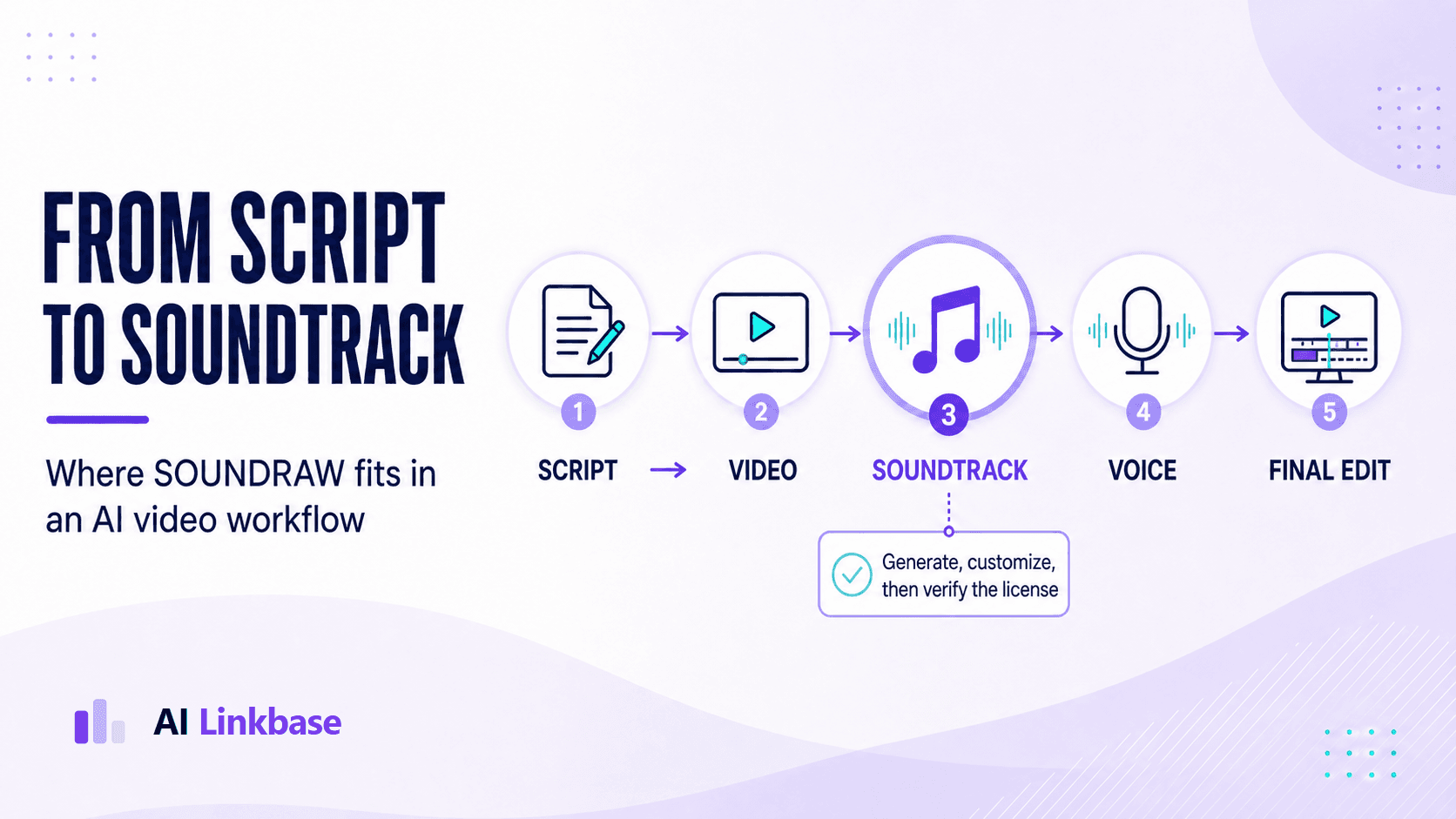
SOUNDRAW is most useful when you need instrumental background music that can be shaped around a finished rough cut—not when you want a one-click replacement for musical judgment. For YouTube creators, its strongest advantage is control over mood, length, energy, and arrangement. Its main limitation is equally important: you still have to choose the right track, protect dialogue clarity, understand the license, and perform a final quality check.
Quick verdict
A strong workflow tool for frequent video creators, but not a substitute for a composer or audio engineer.
Choose SOUNDRAW if you publish enough videos to benefit from repeatable, customizable background music. Start with YouTube Audio Library if your budget is zero and customization is optional. Bring in a human expert when the soundtrack carries the brand, the scene needs precise musical timing, or the final mix must meet a demanding client or broadcast standard.
| Best for | YouTube tutorials, product demos, podcasts, social videos, ads, and small content teams |
|---|---|
| Strongest feature | Generating instrumental directions and reshaping them to match a video's timing |
| Main risk | Treating “commercial use” as permission for every kind of redistribution or rights registration |
| Creator pricing | $19.99 monthly or $16.99/month billed yearly, shown August 30, 2026; verify checkout for regional pricing |
| Our assessment | Best as the music layer inside a broader production system, not as the entire system |
How this review was evaluated
We reviewed SOUNDRAW's official product, Creator plan, pricing, and license pages; compared the workflow with YouTube's official copyright guidance; and built a repeatable production test for a realistic four-minute product tutorial. This is a source-reviewed workflow assessment, not an independent audio laboratory benchmark. Features, prices, and terms can change.
What is SOUNDRAW?
SOUNDRAW is an AI music platform focused on creating and customizing tracks for content production. Instead of browsing a fixed stock library and accepting a track as-is, you select characteristics such as mood, genre, theme, length, and energy, generate alternatives, and adjust the arrangement around the project.
That positioning matters. A text-to-song system may be better when your concept begins with a lyrical or highly specific musical prompt. SOUNDRAW is more naturally suited to the practical question video editors ask every week: “What background track fits this cut, and can I make it rise, soften, or end at the right moment?”
For most creators, the right comparison is not “Can AI compose music?” It is “Can this tool reduce music-search and editing time without creating new licensing or quality problems?” SOUNDRAW can, provided that it enters the workflow after the video's structure is visible.
The SOUNDRAW features that matter in real production
Direction before detail
Mood, genre, theme, tempo, and length help turn a vague request such as “modern but trustworthy” into a useful shortlist. This is faster than auditioning hundreds of unrelated stock tracks.
Arrangement control
The ability to change energy and structure is more valuable than simply generating more songs. It lets an editor align quieter sections with narration and stronger sections with reveals or transitions.
Video-aware timing
The current Creator plan presentation says users can upload a video and adjust musical timing and beats around it. That makes the tool easier to evaluate in context instead of judging music in isolation.
Reusable commercial workflow
Creator-plan use cases include videos, podcasts, games, social media, TV, radio, movies, and advertising. The license still needs to be matched to the exact project and distribution method.
The missing feature is human taste. SOUNDRAW can produce plausible options quickly, but it cannot know whether a confident corporate track makes your founder interview feel generic, whether a busy hi-hat distracts from the product demo, or whether a brand needs a recognizable sonic identity rather than another background bed.
SOUNDRAW pricing: evaluate cost per published video
On August 30, 2026, SOUNDRAW's Creator plan page displayed $19.99 for monthly billing and $16.99 per month with annual billing. Regional prices, promotions, taxes, plan limits, and checkout terms may differ, so treat these figures as a dated snapshot rather than a permanent quote.
| Option | Best fit | Decision rule |
|---|---|---|
| Creator monthly | Testing the workflow or producing a short campaign | Use when flexibility matters more than the annual discount |
| Creator annual | Consistent YouTube, podcast, or social publishing | Compare annual cost with hours saved across the publishing calendar |
| Artist plan | Substantially modified songs intended for music-platform distribution | Do not assume Creator rights cover standalone music distribution |
A useful calculation is cost per published asset. If a $20 month supports eight videos and saves 20 minutes of searching on each, the tool costs about $2.50 per video and saves more than two and a half hours. If you publish once every three months, a free library or one-time human commission may make more sense.
Worked example: scoring a four-minute YouTube product tutorial
Imagine a four-minute tutorial showing a small-business owner how to automate customer follow-up. The video has a direct hook, a calm explanation, a faster screen demonstration, and a short result-and-CTA section. The music should make the tutorial feel polished without turning software instructions into a trailer.
| Time | Editorial job | Music direction |
|---|---|---|
| 0:00–0:15 | Hook and promised outcome | Immediate identity, no long intro, moderate energy |
| 0:15–0:45 | Problem and context | Reduce activity so speech leads |
| 0:45–3:20 | Screen demonstration | Steady pulse with limited melodic distraction |
| 3:20–4:00 | Result, summary, and CTA | Subtle lift, then a clean ending |
The 60-second music brief
Modern instrumental background music for a four-minute SaaS tutorial. Confident and clear, not cinematic. No vocals, aggressive drums, or dense lead melody. Moderate energy for the hook, restrained under the explanation, steady during the demo, and a small lift for the result.
Use a three-track test
Generate three credible directions: a safe baseline, a likely best fit, and one contrasting option. Place the same 20–30 seconds of each under the rough cut. Score the tracks from one to five on emotional fit, dialogue clarity, transition timing, repetition fatigue, and editing effort.
Choose the track with the highest in-context score—not the track that sounds most impressive by itself. Background music succeeds by improving the video while remaining easy to ignore when the viewer needs to understand the message.
A complete AI music workflow for YouTube videos
Recommended sequence
Script → Rough cut → SOUNDRAW shortlist → Voice and music mix → Quality gate → Final export
1. Lock the message and audience
Mark the hook, proof, transitions, and CTA in the script. Write one sentence describing how the viewer should feel. “Confident enough to try the workflow” is more actionable than “uplifting.”
2. Build the rough cut first
Use real narration timing, even if the visuals are still placeholders. Remove obvious pauses and settle the major sections. Generating final music before the cut is stable usually creates avoidable rework.
3. Write the music brief
State the content type, audience, desired emotion, duration, energy changes, and elements to avoid. This brief becomes the standard for evaluating every generated option.
4. Generate a small, diverse shortlist
Three to five useful options are better than dozens of nearly identical tracks. Use one predictable choice and at least one contrast so you can test whether the obvious mood is actually helping.
5. Shape the arrangement around editorial beats
Align energy changes with section boundaries, reveals, and the CTA. Avoid abrupt musical changes that announce the editing technique rather than supporting the story. You can explore the current product through SOUNDRAW.
6. Mix for comprehension
Dialogue should remain effortless to understand. Lower music under speech, watch for busy instruments that occupy similar space, and use short fades instead of hard cuts. Check headphones, laptop speakers, and a phone because a mix that feels balanced in a studio setup may lose speech on small devices.
7. Run a blind quality check
Ask a reviewer to watch without seeing the music brief. Can they understand every sentence? Does the music make the pace feel better? Do any transitions feel repetitive or artificial? If the reviewer comments on the music more than the content, the soundtrack may be too prominent.
8. Verify rights and preserve evidence
Record the plan, track or project reference, download date, intended channel, and a copy or link to the current terms. This is basic production documentation, not legal advice, but it can make future claim resolution much easier.
9. Apply the human-or-export gate
If the video sounds clear, intentional, and on-brand across devices, export it. If the mix feels flat, crowded, inconsistent, or generic—and the asset has real commercial value—send the project to an appropriate human specialist before release.
SOUNDRAW license and YouTube Content ID: what to check
SOUNDRAW's current license page says its plans support personal and commercial projects including YouTube videos, user-generated content, product videos, tutorials, streams, social content, games, client work, radio, TV, and other listed uses. But broad commercial permission is not the same as unrestricted ownership or redistribution.
| Use | Current guidance | What to verify |
|---|---|---|
| Background music in YouTube content | Creator use case | Plan active at download, project type, and channel records |
| Client videos and ads | Commercial use is listed | Client handoff and reuse terms for the exact plan |
| Spotify or Apple Music release | Artist-plan territory after meaningful modification | Required modification, distribution rights, and current restrictions |
| YouTube Content ID registration | Listed as prohibited | Do not register generated music as your exclusive Content ID asset |
| Selling an unmodified track | Not allowed | Do not redistribute downloads as standalone stock music |
Why a licensed track can still receive a claim
YouTube explains that paid or royalty-free third-party music can still be flagged because Content ID does not automatically know that you purchased or licensed the rights. SOUNDRAW's Creator materials say its music is registered with YouTube Content ID and that subscribers can dispute claims using their subscription details.
A claim is not automatically proof that you infringed copyright, and a license is not a promise that automated claims will never happen. Keep your receipt, plan, download date, project record, and the applicable license. Follow YouTube and SOUNDRAW's current dispute instructions rather than copying a generic response from another creator.
When the AI-generated draft needs a human finish
A human step should be conditional, not a toll booth added to every project. A straightforward tutorial with clear narration may be ready after a careful internal review. A campaign video, client deliverable, product launch, signature brand film, or paid ad can justify specialist work because the cost of weak audio is higher.
The decision branch
Script → Rough cut → SOUNDRAW → Voice and mix → Quality check
Pass: Final export
Needs work: Human specialist → Final QC → Export
Mixing & mastering
Use when voice and music fight, loudness feels inconsistent, or the final asset needs dependable commercial delivery.
Browse mixing specialists →Audio editing
Use for dialogue cleanup, tighter timing, better fades, transition repairs, and removing distracting noises or gaps.
Browse audio editors →Composer or sound designer
Use when you need a recognizable brand theme, custom cueing, narrative scoring, or sound design that stock-style music cannot deliver.
Browse composers →Give the specialist the script, rough cut, separated voice and music files, music brief, reference tracks, target platforms, deadline, and a clear description of what currently feels wrong. Hiring a professional without a usable brief often adds another review cycle instead of removing one.
SOUNDRAW limitations to consider before subscribing
Generated variety is not the same as a unique brand sound
A generated track can fit a video without becoming memorable. If your channel depends on a recognizable opening theme or your campaign needs music audiences will associate with one product, a custom composition may create more long-term value. SOUNDRAW is strongest at repeatable production music; it should not automatically be treated as a sonic-brand strategy.
More options can slow the decision
Fast generation often encourages endless auditioning. Set the brief, shortlist limit, scoring criteria, and decision owner before opening the tool. If no track clears the quality threshold after a focused round, change the brief or escalate instead of generating another 30 variations.
The subscription does not perform the final mix
Even a well-arranged track can mask narration, exaggerate an edit, or end awkwardly. The editor remains responsible for fades, levels, speech clarity, and cross-device checks. A license solves a rights question; it does not solve a production-quality question.
License language still requires project-level judgment
Creator background use, modified music distribution, Content ID registration, and standalone resale are different activities. Teams should avoid turning a short marketing phrase such as “commercial use” into an internal blanket policy. When the use is unusual, high-value, or hard to reverse, ask SOUNDRAW for written clarification or consult a qualified rights professional.
A pre-publish checklist for creators and small teams
- The chosen track supports the video's message instead of competing with it.
- Dialogue remains clear on headphones, a laptop, and a phone.
- Energy changes land near intentional editorial beats and do not feel abrupt.
- The ending is clean and the CTA is not buried by a musical peak.
- The plan and current license cover the intended channel, client, and distribution method.
- The team saved the project reference, download date, subscription evidence, and applicable terms.
- No one intends to register the generated track in Content ID or resell it as standalone stock music.
- A second reviewer approved the final export—or the project was routed to a human specialist.
SOUNDRAW alternatives: choose by production need
| Option | Choose it when | Main tradeoff |
|---|---|---|
| SOUNDRAW | You need frequent, customizable instrumental beds fitted to video timing | Subscription cost and responsibility for selection, mix, and license records |
| YouTube Audio Library | You need a free source YouTube identifies as copyright-safe | Less arrangement control; some Creative Commons tracks require attribution |
| Eleven Music | You want prompt-driven full tracks, vocals or instrumentals, and section-level generation | Different creative workflow and separate music terms to evaluate |
| Human composer | Music carries the brand or must hit specific narrative moments | Higher cost and longer turnaround, but greater originality and direction |
Who should use SOUNDRAW—and who should skip it?
Good fit
- ✓ You publish multiple videos or podcast episodes each month
- ✓ You need instrumental music shaped around voice-led content
- ✓ Your team wants a repeatable shortlist-and-review system
- ✓ You are willing to document licenses and check the final mix
Consider another route
- • You only need occasional free background music
- • You need a signature song, vocals, or tightly scored narrative work
- • You expect AI to make every editorial and mixing decision
- • Your intended distribution falls outside the current plan terms
Final verdict
SOUNDRAW earns its place in a YouTube workflow by shortening the distance between “we need music” and “we have three editable options that match this cut.” That is a meaningful operational advantage for creators and small teams publishing on a schedule.
The best results come from a disciplined process: edit first, write a brief, test several tracks in context, protect the voice, verify the license, and use a human quality gate when the stakes justify it. Follow that process and SOUNDRAW can be a productive music layer. Skip it, and faster generation may simply produce faster mediocrity.
Ready to test the workflow on a real video?
Use one finished rough cut, generate only three candidates, and compare them before choosing a subscription.
Try SOUNDRAW on your next video →Official sources and disclosure
- SOUNDRAW license — plan scope, commercial uses, distribution, and prohibited uses.
- SOUNDRAW Creator plan — workflow, pricing presentation, Content ID guidance, and post-subscription licensing statement.
- YouTube: copyright-safe music — why paid or royalty-free music can still receive automated claims.
- YouTube Audio Library guidance — copyright-safe use, monetization, and attribution notes.
- Eleven Music documentation — prompt-to-music and section-editing capabilities.
Disclosure: AI Linkbase may earn a commission from eligible SOUNDRAW and Fiverr purchases made through links in this guide, at no extra cost to you. That relationship does not change the evaluation criteria. Features, prices, licenses, and partner terms can change; confirm the official pages before purchasing or publishing.